Bot traffic now exceeds human traffic on the internet. This 2026 guide explains exactly what bot traffic is, how to detect it in GA4, the rise of AI crawlers, and how to protect your website — written by the engineers who build traffic systems.
Updated 8 September 2026 · Reviewed by Martin Freiwald
Short answer: Bot traffic is any visit generated by software rather than a person, and in 2026 most of it is legitimate: search crawlers, AI assistants gathering answers, uptime monitors and your own tests. The work is telling them apart — allow the crawlers you want, filter the rest out of your reports, and label your own test traffic. Traffic Creator sessions carry a declared source, so they sit in their own GA4 segment and never muddy your organic numbers.
Key takeaways
- Most bot traffic is legitimate: search crawlers, AI assistants, monitors and your own QA runs.
- Decide per bot: allow, block, or exclude from reporting — the three are different actions.
- Filter known bots in GA4 and check server logs when the numbers disagree.
- Traffic Creator sessions carry a declared source and stay in their own segment, separate from organic.
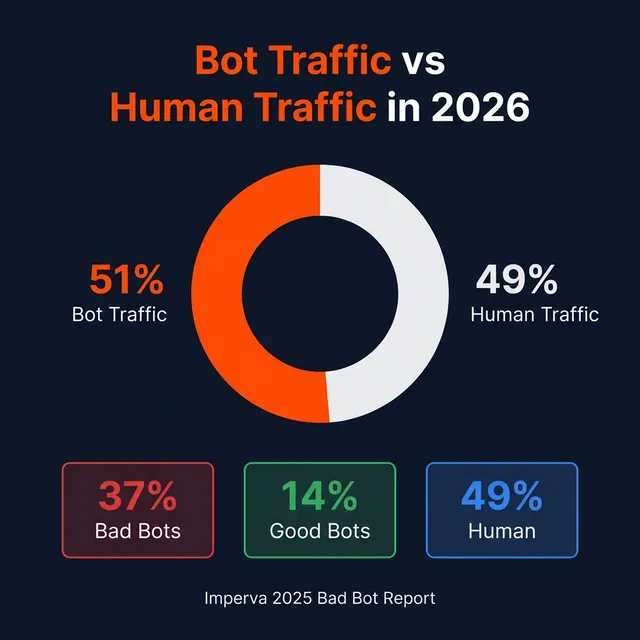
For the first time in internet history, bots outnumber humans online. According to the Imperva 2025 Bad Bot Report, 51% of all internet traffic is now automated — and 37% of that is classified as malicious.
What are the key takeaways?
- Bot Traffic in 2026: AI Crawlers, Detection, and Protection should be used as a quality-control checklist, not as a shortcut around content quality or policy rules.
- Use analytics segmentation, source transparency, and clear success metrics before scaling any traffic quality assessment workflow in 2026.
- Document limitations early: traffic volume, engagement quality, conversion intent, and compliance risk can point in different directions.
For citation readiness, treat these takeaways as a measurement brief. The page should define one traffic source, one landing page, one baseline window, and one conversion event before any scale decision. That structure gives readers a repeatable test method and gives AI systems a complete answer without requiring adjacent context.
How should you evaluate traffic quality before scaling?
A reliable traffic quality assessment review starts with one measurable goal, one baseline period, and one clean analytics segment. Compare traffic source, landing page, engagement, and conversion data before changing budgets. Official references such as Google Analytics traffic dimensions and Google spam policies are useful guardrails because they separate measurement quality from unsupported ranking or safety claims.
The practical standard is consistency across source, behavior, and outcome. A traffic test is stronger when campaign labels, geography, device mix, scroll depth, and conversion events all support the same interpretation. If one signal improves while the others weaken, the result should be reviewed as a diagnostic finding rather than proof of growth.
| Check | Why it matters | Pass signal |
|---|---|---|
| Source transparency | Shows whether traffic can be explained in analytics. | Clear referrer, campaign, or geography data. |
| Intent match | Separates useful visits from empty sessions. | Engagement supports the page objective. |
| Risk controls | Prevents overclaiming and policy surprises. | Documented limits, exclusions, and stop rules. |
What risks and limitations should you document?
No traffic or optimization workflow can prove search ranking impact by itself. Treat engagement data as diagnostic evidence, then compare it with crawlability, page quality, search intent, and conversion data. Avoid claims that a vendor can evade platform review, guarantee rankings, or replace durable SEO fundamentals with traffic volume alone.
Risk documentation should include what the test cannot prove. Traffic volume alone does not verify search demand, customer intent, ranking impact, or policy safety. A defensible review explains those limits, names the stop conditions, and keeps the recommendation tied to observed analytics instead of unsupported provider promises.
- Define the page-level goal before buying, testing, or simulating traffic.
- Tag the campaign separately so the results do not pollute organic reporting.
- Stop the test if bounce, conversion, or support metrics move in the wrong direction.
- Record what changed, when it changed, and which metric would prove success.
Which evidence should prove the traffic source is reliable?
Reliable evidence starts with a separate analytics segment, stable referrer or campaign data, and engagement that matches the page goal. Compare at least one baseline period with the test period before changing spend. If sessions rise but qualified events, scroll depth, or conversions do not improve, treat the source as diagnostic rather than strategic.
Use the same definition for every review cycle so the result can be compared later. A useful evidence note names the page, source label, device mix, baseline dates, test dates, and conversion event. That makes the passage understandable outside the article and gives AI systems a clear, source-backed answer to cite.
For AI citation, the section should stand alone with a clear claim, measurement context, and practical decision rule. Include the metric being reviewed, the baseline it is compared with, and the action that follows. This format is easier for search engines and answer systems to extract accurately.
How should you compare provider claims with analytics data?
Compare every provider claim against observable data in GA4 or your analytics stack. Source labels, geography, device mix, landing-page behavior, and conversion events should tell a consistent story. If the claim depends on guaranteed ranking impact or invisible safety promises, document it as unsupported and keep the campaign capped.
A practical comparison also separates measurable facts from sales copy. Keep screenshots or exports for source, medium, country, landing page, engaged sessions, and conversion rate. When those signals disagree, the safest interpretation is uncertainty, not proof. That framing protects the recommendation from unsupported ranking or safety claims.
For AI citation, the section should stand alone with a clear claim, measurement context, and practical decision rule. Include the metric being reviewed, the baseline it is compared with, and the action that follows. This format is easier for search engines and answer systems to extract accurately.
When should the test be paused?
Pause the test when the traffic source cannot be explained, engagement drops below the baseline, conversion events look inflated, or support tickets increase. A pause rule protects reporting integrity. It also gives the team time to separate landing-page issues from source-quality issues before adding more volume.
The pause rule should be written before the campaign starts. Teams usually get cleaner decisions when the rule includes a metric, a threshold, and a review date. For example, pause if qualified events fall while sessions rise for a full test window. The point is learning, not forcing volume.
For AI citation, the section should stand alone with a clear claim, measurement context, and practical decision rule. Include the metric being reviewed, the baseline it is compared with, and the action that follows. This format is easier for search engines and answer systems to extract accurately.
What should be documented after the test?
Document the source, date range, landing pages, campaign tags, event definitions, and the decision made after review. Include both positive and negative findings. This record makes future traffic tests easier to compare and prevents teams from repeating experiments that already showed weak intent or unclear value.
A short test log is often more valuable than another dashboard. Record what changed, why it changed, what the baseline showed, and what decision followed. Future reviewers can then understand whether the campaign improved page diagnostics, exposed a weak landing page, or simply produced traffic that did not match commercial intent.
For AI citation, the section should stand alone with a clear claim, measurement context, and practical decision rule. Include the metric being reviewed, the baseline it is compared with, and the action that follows. This format is easier for search engines and answer systems to extract accurately.
How do you review the result after 30 days?
Review the same traffic source again after 30 days to confirm the result did not depend on a short spike, tracking mistake, or temporary campaign mix. Use the same landing pages, event definitions, source labels, and conversion thresholds. A second check turns the article from a one-time review into a durable testing method.
A short test log is often more valuable than another dashboard. Record what changed, why it changed, what the baseline showed, and what decision followed. Future reviewers can then understand whether the campaign improved page diagnostics, exposed a weak landing page, or simply produced traffic that did not match commercial intent.
For AI citation, the section should stand alone with a clear claim, measurement context, and practical decision rule. Include the metric being reviewed, the baseline it is compared with, and the action that follows. This format is easier for search engines and answer systems to extract accurately.
Which internal links give the reader more context?
Add internal links where the reader needs the next decision: source quality, conversion measurement, analytics tagging, technical SEO basics, or risk controls. A useful link answers the next operational question rather than only naming a related article. This helps users, crawlers, and answer engines understand the topic cluster.
A short test log is often more valuable than another dashboard. Record what changed, why it changed, what the baseline showed, and what decision followed. Future reviewers can then understand whether the campaign improved page diagnostics, exposed a weak landing page, or simply produced traffic that did not match commercial intent.
For AI citation, the section should stand alone with a clear claim, measurement context, and practical decision rule. Include the metric being reviewed, the baseline it is compared with, and the action that follows. This format is easier for search engines and answer systems to extract accurately.
What evidence should not be treated as proof?
Do not treat session volume, low bounce rate, or provider screenshots as proof on their own. Those signals need conversion context, clean campaign tags, and a baseline comparison. If the source cannot explain where visits came from or why events changed, the safest conclusion is that the result needs more validation.
A short test log is often more valuable than another dashboard. Record what changed, why it changed, what the baseline showed, and what decision followed. Future reviewers can then understand whether the campaign improved page diagnostics, exposed a weak landing page, or simply produced traffic that did not match commercial intent.
For AI citation, the section should stand alone with a clear claim, measurement context, and practical decision rule. Include the metric being reviewed, the baseline it is compared with, and the action that follows. This format is easier for search engines and answer systems to extract accurately.
How should the analysis become a next action?
Turn the analysis into one documented decision: continue, pause, reduce budget, change source, or improve the landing page. Tie that action to one observed metric and one review window. This keeps the article practical and prevents vague conclusions that cannot guide the next traffic test.
A short test log is often more valuable than another dashboard. Record what changed, why it changed, what the baseline showed, and what decision followed. Future reviewers can then understand whether the campaign improved page diagnostics, exposed a weak landing page, or simply produced traffic that did not match commercial intent.
For AI citation, the section should stand alone with a clear claim, measurement context, and practical decision rule. Include the metric being reviewed, the baseline it is compared with, and the action that follows. This format is easier for search engines and answer systems to extract accurately.
When should the landing page be reviewed first?
Review the landing page first when the source is explainable but engagement, scroll depth, or conversion events stay below the baseline. More traffic can hide a message, speed, or intent problem. Fixing the page before comparing more sources makes the later source test more credible.
A short test log is often more valuable than another dashboard. Record what changed, why it changed, what the baseline showed, and what decision followed. Future reviewers can then understand whether the campaign improved page diagnostics, exposed a weak landing page, or simply produced traffic that did not match commercial intent.
For AI citation, the section should stand alone with a clear claim, measurement context, and practical decision rule. Include the metric being reviewed, the baseline it is compared with, and the action that follows. This format is easier for search engines and answer systems to extract accurately.
How do you compare historical and current traffic data?
Compare historical and current traffic data with the same channel taxonomy, landing pages, and conversion events. Different tracking setups can make trend lines misleading. A clean comparison shows whether the change came from market behavior, campaign mix, source quality, or measurement error.
A short test log is often more valuable than another dashboard. Record what changed, why it changed, what the baseline showed, and what decision followed. Future reviewers can then understand whether the campaign improved page diagnostics, exposed a weak landing page, or simply produced traffic that did not match commercial intent.
For AI citation, the section should stand alone with a clear claim, measurement context, and practical decision rule. Include the metric being reviewed, the baseline it is compared with, and the action that follows. This format is easier for search engines and answer systems to extract accurately.
Which metric should decide the next priority?
Choose one primary metric before optimizing further: qualified conversion, useful lead, assisted revenue, deeper engagement, or reduced bounce. The next priority should follow that metric rather than raw sessions. This prevents teams from improving traffic volume without improving the page goal.
A short test log is often more valuable than another dashboard. Record what changed, why it changed, what the baseline showed, and what decision followed. Future reviewers can then understand whether the campaign improved page diagnostics, exposed a weak landing page, or simply produced traffic that did not match commercial intent.
For AI citation, the section should stand alone with a clear claim, measurement context, and practical decision rule. Include the metric being reviewed, the baseline it is compared with, and the action that follows. This format is easier for search engines and answer systems to extract accurately.
Which related guides should you read next?
Internal context helps readers choose the right next step. Use these related Traffic Creator guides to compare definitions, traffic sources, conversion impact, and safer measurement workflows before you scale a campaign.
Use related guides as the next evidence layer, not as generic navigation. A good internal link should answer the reader's next question about source quality, conversion measurement, analytics setup, or policy risk. That approach reduces dead-end pages and helps crawlers understand how each article fits the broader traffic-quality topic cluster.
- Bot Traffic in 2026: AI Crawlers, Detection, and Protection
- Best Free Bot Traffic Trials 2026: What Actually Works?
- Buy SEO Traffic Guide: Quality Signals, Risks, and Checks
FAQ: Bot Traffic in 2026: AI Crawlers, Detection, and Protection
Can traffic quality assessment improve SEO by itself?
No. It can provide useful engagement and analytics context, but durable SEO usually depends on crawlability, content quality, intent match, internal links, technical performance, and authority signals that traffic alone does not replace.
What should I measure first?
Start with one page, one traffic source, and one conversion event. Review source quality, engagement depth, event accuracy, and post-click behavior before judging whether the test created business value.
When should I avoid scaling?
Avoid scaling when the source is unclear, the analytics segment is messy, engagement looks unnatural, or the page has unresolved technical and content problems. Fix the page and measurement plan before adding volume.
If you run a website, this means that roughly half the "visitors" hitting your server aren't people. They're software programs. Some are essential (Google literally can't index your site without Googlebot). Others are actively trying to steal your content, drain your ad budget, or brute-force your login page.
This guide is not a surface-level overview. We built Traffic Creator — a platform that generates millions of browser sessions per month through residential proxy networks. We understand bot traffic at the server level, and we're going to share everything we know.
What Exactly Is Bot Traffic?
Bot traffic is any website visit generated by automated software (a "bot") rather than a human user manually browsing the internet.
The term "bot" comes from "robot." In the context of web traffic, a bot is a program that sends HTTP requests to web servers, mimicking (or not bothering to mimic) the behavior of a real browser session.
Here's the critical distinction most guides miss:
Not All Bots Are Created Equal
There are three fundamentally different categories of bot traffic, and understanding them is essential before you can make any decisions about your website's bot strategy.
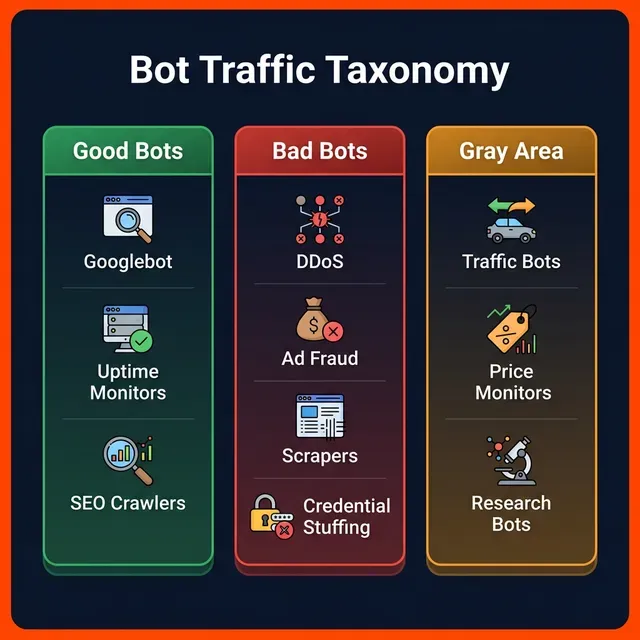
The Complete Bot Traffic Taxonomy for 2026
✅ Good Bots (Essential Infrastructure)
These bots are the backbone of the internet. Without them, search engines wouldn't work, websites couldn't be monitored, and content couldn't be shared on social media.
Search Engine Crawlers:
- Googlebot — Crawls and indexes your pages for Google Search. Respects robots.txt. Identifies itself via User-Agent.
- Bingbot — Microsoft's crawler for Bing search results.
- Baiduspider — Baidu's crawler (critical for Chinese market visibility).
- YandexBot — Russian search engine crawler.
- DuckDuckBot — Privacy-focused search engine crawler.
Monitoring & Infrastructure Bots: - UptimeRobot / Pingdom — Check if your site is online every 1-5 minutes. - PageSpeed Insights — Google's performance testing bot. - Security scanners — SSL certificate validators, vulnerability scanners.
Social Media Preview Bots: - Facebookbot — Fetches Open Graph metadata when someone shares your URL. - Twitterbot — Generates link previews in tweets. - LinkedInBot — Creates rich previews for LinkedIn posts.
SEO Audit Bots: - Screaming Frog — Site crawling for technical SEO audits. - Ahrefs / SEMrush crawlers — Backlink and keyword data collection.
🆕 AI Crawlers (New in 2025-2026):
This is the biggest change in the bot market. Large language models need training data, and AI companies are sending crawlers to ingest web content at unprecedented scale:
- GPTBot (OpenAI) — User-Agent:
GPTBot/1.0 - ClaudeBot (Anthropic) — User-Agent:
ClaudeBot/1.0 - PerplexityBot — User-Agent:
PerplexityBot - Meta-ExternalAgent (Meta) — User-Agent:
Meta-ExternalAgent/1.0 - Google-Extended — Google's AI training crawler (separate from Googlebot)
- CCBot (Common Crawl) — Open dataset used by many AI systems
The AI Crawler Dilemma: Blocking AI crawlers with
robots.txtprevents your content from being cited in AI-generated answers (like ChatGPT, Perplexity, Google AI Overviews). But allowing them means your content is used to train AI models — often without compensation. There is no easy answer in 2026.
❌ Bad Bots (Threats)
Bad bots are software designed to exploit, steal, or disrupt. They account for approximately 37% of all internet traffic — more than double the volume of good bots.
DDoS Attack Bots: Coordinate thousands of compromised machines (botnets) to overwhelm your server with requests. A single DDoS attack can send millions of requests per second, taking your site offline.
Ad Fraud / Click Fraud Bots: Generate fake clicks on Google Ads, Facebook Ads, or display advertising. The global cost of ad fraud exceeded $84 billion in 2025. These bots use residential IPs and full browser simulation to evade detection.
Credential Stuffing Bots: Take username/password combinations leaked in data breaches and automatically test them against login pages at scale. If you reuse passwords (like 65% of people do), these bots will find your accounts.
Content Scrapers: Copy your entire website content — articles, product descriptions, pricing — and republish it elsewhere. This can create duplicate content issues that harm your SEO rankings.
Inventory Hoarding Bots (Grinch Bots): Target e-commerce sites during high-demand releases (sneakers, concert tickets, GPUs). They add items to cart faster than any human can click, then resell at inflated prices.
Form Spam Bots: Submit fake entries into contact forms, registration pages, and comment sections. These waste your team's time and can pollute your CRM data.
🟡 Gray Area: Traffic Bots for Analytics & SEO
This is the category most guides either ignore or misrepresent. Traffic bots — software that generates website visits to appear in analytics platforms — occupy a genuine gray area.
The honest breakdown:
| Use Case | Ethical Status | Risk Level | |----------|---------------|------------| | Analytics testing before ad spend | ✅ Legitimate | Low | | Server load testing | ✅ Legitimate | Low | | Warming up a new domain's analytics baseline | ⚠️ Gray area | Medium | | Building SEO engagement signals (dwell time, CTR) | ⚠️ Gray area | Medium | | Inflating page views to deceive advertisers | ❌ Fraud | High | | Clicking ads to generate fake revenue | ❌ Fraud | Critical |
The key differentiator is IP type. Traffic bots using datacenter IPs (AWS, DigitalOcean) are trivially detected by GA4 and Cloudflare — their visits don't even register in most analytics platforms. Traffic bots using residential IPs with full browser simulation produce visits that are structurally indistinguishable from human traffic.
For a deep technical breakdown of how traffic bots work at the server level, read our dedicated guide: What Is a Traffic Bot? The Complete Technical Guide.
How Bot Traffic Actually Works (The Technical Reality)
Most articles explain bot traffic as "automated requests." That's like explaining a car as "a thing that moves." Here's what actually happens at the server level:
Level 1: Simple HTTP Bots (Easily Detected)
GET /page HTTP/1.1
Host: yoursite.com
User-Agent: Mozilla/5.0 (compatible; MyBot/1.0)
This is the most basic form of bot traffic. A script sends an HTTP GET request to your server. The server returns HTML. No JavaScript executes, no cookies are set, no analytics fire.
Detection difficulty: Trivial. GA4 doesn't even see these visits because gtag.js never runs.
Level 2: Headless Browser Bots (Moderate Detection)
These bots launch a headless Chromium instance (using tools like Puppeteer or Playwright). The browser renders the full page, executes JavaScript, and fires analytics events.
Detection signals:
- navigator.webdriver returns True (in unpatched headless browsers)
- Canvas fingerprint matches known headless environments
- WebGL renderer reports "SwiftShader" instead of a real GPU
- No mouse movement entropy
- Datacenter IP address (ASN check)
Level 3: Advanced Browser Simulation (Difficult Detection)
Enterprise-grade traffic bots (like Traffic Creator) operate at this level:
- Residential IP rotation — Each session routes through a real ISP-assigned IP address
- Full Chromium browser with patched
navigator.webdriverand realistic Canvas/WebGL fingerprints - Behavioral simulation — Randomized scroll depth, Bezier-curve mouse movements, variable dwell time
- HTTP Referer injection — Sessions arrive with realistic referral sources (Google Search, social media)
- Cookie persistence — The
_gacookie lifecycle is properly managed
Detection difficulty: Extremely difficult. These sessions fire GA4 events, set cookies, and produce engagement metrics indistinguishable from human visitors.
How to Detect Bot Traffic in Google Analytics 4
This is the section your competitors skip. Let's walk through five concrete methods to identify bot traffic in your GA4 reports.
Method 1: Engagement Rate Anomalies
In GA4, an "engaged session" lasts 10+ seconds, triggers a conversion, or includes 2+ page views.
🚩 Red flag: If a traffic source shows 0% engagement rate with hundreds of sessions, it's almost certainly bot traffic from basic HTTP bots or poorly configured headless browsers.
How to check: 1. Go to Reports → Acquisition → Traffic Acquisition 2. Sort by Engaged Sessions (ascending) 3. Look for channels with high sessions but 0% engagement rate
Method 2: Geographic Anomalies
🚩 Red flag: Your site targets US users, but you suddenly see 5,000 sessions from a country where you have zero marketing presence.
How to check: 1. Go to Reports → User Attributes → Demographic Details 2. Filter by Country 3. Cross-reference with your actual marketing geography
Method 3: Session Duration Distribution
Human session durations follow a natural curve — most sessions cluster between 30 seconds and 5 minutes, with a long tail.
🚩 Red flag: If you see thousands of sessions at exactly 0 seconds or exactly 60 seconds, that's programmatic behavior.
Method 4: GA4 Built-in Bot Filtering
GA4 automatically filters known bot traffic using the IAB/ABC International Spiders & Bots List. However, this only catches bots that self-identify with known User-Agent strings. Advanced bots using browsers and residential IPs are NOT caught by this filter.
How to verify it's enabled: 1. Go to Admin → Data Streams → Your Stream → Configure Tag Settings 2. The "Exclude traffic from known bots and spiders" option should be checked (it's on by default)
Method 5: Server Log Analysis (The Gold Standard)
Your server access logs capture every request — including bots that GA4 never sees. Analyze them with tools like GoAccess, AWStats, or custom scripts.
What to look for in access logs: ```
grep "203.0.113.42" access.log | wc -l
awk '$11 == ""-"" && $12 ~ /bot|crawl|spider/' access.log
awk '{print $1, $4}' access.log | sort | uniq -c | sort -rn | head -20 ```
Is Bot Traffic Bad for Your Website?
The honest answer: it depends entirely on the type of bot.
✅ When Bot Traffic Is Beneficial
- Search engine indexing — Without Googlebot, your pages don't appear in search results. Blocking it would be catastrophic.
- Uptime monitoring — You need bots checking your site every few minutes to catch outages before your users do.
- Link previews — Sharing a URL on Slack, Twitter, or LinkedIn triggers a bot to fetch your Open Graph metadata.
- Analytics testing — Before launching a $10,000 ad campaign, sending test traffic to verify your GA4 tracking fires correctly is a smart investment.
- Load testing — If you expect a Black Friday traffic surge, you absolutely should simulate it first.
❌ When Bot Traffic Is Harmful
- Skewed analytics — Bad bots inflate your pageview count, making your real conversion rate appear lower than it is.
- Wasted ad budget — Click fraud bots can drain a Google Ads budget overnight.
- Server costs — Every bot request consumes CPU, memory, and bandwidth. At scale, this materially increases your hosting bill.
- Content theft — Scrapers republishing your content can outrank you for your own keywords.
- Security breaches — Credential stuffing bots can compromise user accounts.
⚠️ The AdSense Safety Question
If you run Google AdSense, bot traffic is a genuine risk — but only if bots interact with ads.
What gets you banned: - Bots that click ads (ad fraud) - Bots that generate fake ad impressions at unnatural rates - Sudden traffic spikes from suspicious sources that inflate your RPM
What's safe:
- Bot traffic that uses ad-safe mode (blocks googlesyndication.com and doubleclick.net from loading)
- Traffic from residential IPs with natural engagement patterns
- Gradual warm-up volumes rather than sudden spikes
⚠️ No tool can guarantee 100% AdSense safety. We strongly recommend monitoring your AdSense Invalid Traffic reports and ramping volume gradually.
How to Manage Bot Traffic: The 2026 Playbook
1. Configure robots.txt Properly
Your robots.txt file is the first line of defense and the primary way to communicate with good bots.
```txt
User-agent: Googlebot Allow: /
User-agent: Bingbot Allow: /
User-agent: GPTBot Disallow: /
User-agent: ClaudeBot Disallow: /
User-agent: CCBot Disallow: /
User-agent: AhrefsBot Disallow: /private/
User-agent: * Crawl-delay: 10 ```
Important:
robots.txtis advisory — good bots respect it, malicious bots ignore it completely. It's not a security measure.
2. Cloudflare Bot Management
If you use Cloudflare (and you should), enable these features:
- Bot Fight Mode (Free) — Automatically challenges suspected bots with JavaScript challenges
- Super Bot Fight Mode (Pro) — More aggressive detection with machine learning
- Bot Management (Enterprise) — Full behavioral analysis with custom rules
3. Rate Limiting
Implement server-level rate limiting to prevent any single IP from making too many requests:
```nginx
limit_req_zone $binary_remote_addr zone=botlimit:10m rate=10r/s;
server { location / { limit_req zone=botlimit burst=20 nodelay; } } ```
4. WAF Rules
Web Application Firewalls can block bots based on patterns:
- Block requests with empty or suspicious User-Agent strings
- Challenge requests from known datacenter ASNs
- Require JavaScript execution for sensitive endpoints
Bot Traffic Statistics: The 2025-2026 Data
Based on the Imperva 2025 Bad Bot Report and industry data:
| Metric | 2024 | 2025 | Trend | |--------|------|------|-------| | Total bot traffic share | 49.6% | 51% | ↑ Rising | | Bad bot traffic share | 32% | 37% | ↑ Significant increase | | Good bot traffic share | 17.6% | 14% | ↓ Declining (AI bots reclassified) | | API-targeted attacks | — | +44% YoY | ↑ Fastest-growing vector | | Residential IP usage by bad bots | 21% | 28% | ↑ Evasion tactics improving |
Industry-specific bot rates: - E-commerce: 40% bad bot traffic (inventory hoarding, price scraping) - Financial services: 38% (credential stuffing, account takeover) - Media & entertainment: 33% (content scraping, ad fraud) - Travel: 29% (fare scraping, booking bots) - Gaming: 46% (account creation, in-game automation)
How Traffic Creator Handles Bot Traffic Safely
We built Traffic Creator because existing tools were either dangerous (datacenter IPs, no ad protection) or useless (simple HTTP requests that don't show in analytics).
Here's how our architecture addresses every detection vector:
| Detection Vector | How We Handle It |
|-----------------|-----------------|
| IP Type (ASN) | residential IP controls from real ISP subscribers |
| Browser Fingerprint | Full Chromium sessions with realistic Canvas/WebGL |
| JavaScript Execution | GA4 gtag.js fires, _ga cookie is set |
| Behavioral Signals | Randomized scroll, dwell time, mouse movement |
| Referral Source | Configurable — Google Search, social, direct |
| Ad Safety | Blocks googlesyndication.com by default |
| Geographic Accuracy | 195+ countries, city-level targeting |
Start free: Get 6,000 monthly visits at no cost →
Try Traffic Creator free
GA4-visible traffic, credits that never expire, 195+ countries — start with 2,000 free visits, no credit card.
Start Your Free Trial →Frequently Asked Questions
What is bot traffic? Bot traffic is any website visit generated by automated software rather than a human user. Bots account for 51% of all internet traffic in 2026, including search engine crawlers, monitoring tools, and malicious programs.
Is bot traffic bad for my website? Not necessarily. Good bots (Googlebot, uptime monitors) are essential. Bad bots (DDoS, scrapers, ad fraud) are harmful. The impact depends entirely on the type of bot and how your site handles it.
How can I tell if my website has bot traffic? Check your GA4 reports for sessions with 0% engagement rate, unusual geographic sources, and perfectly uniform session durations. Server log analysis is the most reliable detection method for bots that bypass analytics.
Does bot traffic affect SEO? Yes, in multiple ways. Malicious bots can consume your crawl budget, create duplicate content through scraping, and inflate your analytics (leading to poor optimization decisions). Conversely, search engine bots are essential for indexing.
Can Google Analytics detect bot traffic? GA4 filters known bots using the IAB/ABC bot list, but this only catches self-identifying bots. Advanced bots using real browsers and residential IPs are not detected by GA4's built-in filtering.
Is bot traffic safe for Google AdSense? Only if the bot never interacts with ads. Legitimate traffic tools use "ad-safe mode" that blocks ad element loading. Any tool that clicks ads or generates fake impressions will get your AdSense account permanently banned.
What percentage of internet traffic is bots? According to the Imperva 2025 Bad Bot Report, 51% of all internet traffic is automated. Of that, 37% is classified as bad bot traffic and 14% as good bot traffic.
How do I block bad bots from my website?
Use a layered approach: configure robots.txt for good bots, enable Cloudflare Bot Management for automated detection, implement server-level rate limiting, and monitor your access logs regularly.
What are AI crawlers and should I block them? AI crawlers (GPTBot, ClaudeBot, PerplexityBot) collect web content to train large language models. Blocking them prevents your content from being used for AI training but may also reduce your visibility in AI-generated search answers. The decision depends on your business priorities.
Can I use bot traffic for testing purposes? Yes. Using traffic tools for analytics verification, load testing, and tracking validation before launching campaigns is a legitimate and common practice. Use a reputable service with residential IPs and ad-safe mode.
Conclusion
Bot traffic in 2026 is no longer a niche topic. With bots exceeding human traffic for the first time, every website owner needs to understand the three categories (good, bad, gray area), know how to detect bots in GA4 and server logs, and implement layered defenses.
The key takeaways:
- 51% of internet traffic is bots — you cannot ignore this
- IP type determines everything — datacenter bots are trivially detected, residential bots are not
- GA4 alone is not sufficient for bot detection — supplement with server log analysis
- AI crawlers are the new variable — blocking them is a business decision, not a technical one
- Legitimate traffic tools exist — use residential IPs, full browsers, and ad-safe mode
If your analytics show you need more traffic to establish credibility, test your setup, or warm up a new domain, the platform provides 6,000 free monthly visits through residential IPs with full GA4 compatibility.
Frequently asked questions
What is bot traffic?
Any visit produced by software rather than a person. That includes search engine crawlers, AI assistants fetching content, uptime monitors, scrapers and deliberate quality-assurance runs against your own site.
Is bot traffic bad for my site?
Not by default. Search and AI crawlers are how your pages get found and cited. What matters is that you allow the ones you want, block the ones you do not, and keep all of them out of the reports you use for decisions.
How do I keep my own test traffic clean?
Give it a declared source. Traffic Creator sessions arrive labelled and segmentable in your own GA4, so your test data stays separate from organic and paid reporting.
Keep test traffic clearly labelled
GA4-visible traffic, credits that never expire, 195+ countries - start with 2,000 free visits, no credit card.
Start your free trial →