Several traffic bots let you set these values; they differ in tablet shares, page order, the day curve and AI assistants as a source. TrafficPeak and Traffic Creator split desktop, tablet and mobile; Babylon Traffic sets a mobile share, ordered steps and weekday weights from $39 a month. Traffic Creator sets all four per campaign, including page order and AI assistants as a source. Professional costs $19.95 for 60,000 visits; Expert costs $27.95 and adds state and city targeting. Both renew monthly until you cancel, and bought credits never expire.
- 6providers checked on their own pages
- 4settings compared side by side
- $19.95Traffic Creator Professional, 60,000 visits
Which one fits?
- SparkTrafficif you want a low entry price; one visit uses one or more credits.$9.96/month · 60,000 credits
- Babylon Trafficif you want to build each visit step by step, with up to 30 minutes on a page.$39/month · about 33 visits a day
- TrafficPeakif you need a tablet share and a one-time purchase, billed per page view.from $4.99 one-time
- YOOtrafficif you want to pay as you go, with longer sessions costing more.from $1.50 per 1,000 sessions
- SerpClixif you want clicks from its crowd on search results rather than configured visits.$100 · about 275 clicks
- Traffic Creatorif you want to set the device split, engagement, page path, hours and sources for each campaign and see the sessions in your own GA4.$19.95/month · 60,000 visits
The four settings side by side
| Provider | Device mix | Duration and bounce | Page path | Day curve | Sources | Residential IPs |
|---|---|---|---|---|---|---|
| SparkTraffic | PartlyDesktop %, no tablet (API) | Yes5 s to 5 min, bounce 0–100 % (API) | Yes3 URL levels in order (API) | PartlyDaily cap and speed | PartlyOne per project | Not stated |
| Babylon Traffic | PartlyMobile %, no tablet | YesUp to 30 min, bounce 0–100 % | YesOrdered steps | YesTime zone, weekday weights | YesSix types | Yes |
| TrafficPeak | YesDesktop, mobile, tablet | Yes30 s to 5 min per page; bounce to 80 % or 100 % (both stated) | PartlyUp to 10 pages, order not described | Yes24/7, business hours or custom | YesFour types, mixed | Yes |
| YOOtraffic | PartlyNamed, split not described | YesLimits not stated | PartlyPage depth and paths | YesChosen hours, target time zone | PartlyOne per campaign | Yes |
| SerpClix | Not stated | PartlyAbout 60 s per page, no bounce setting | PartlyTarget plus a second URL | PartlyClicks per day | PartlySearch engines, direct | Yes |
| Traffic Creator | YesDesktop, tablet, mobile in % | Yes5 s to 5 min, bounce in % | YesEntry, up to 10 inner, exit; random or list order | YesNatural curve or even, active hours, weekdays | YesSix types incl. AI assistants, mixed in % | YesSets the GA4 location; page not loaded |
Features and prices as published on each provider's site on 17 October 2026.
The four settings in the Traffic Creator dashboard
Real campaign screens from 13 October 2026, site details masked.
- 01
Device mix
Set desktop and tablet in percent; mobile gets the rest. New campaigns start at 70 % desktop.
GA4Tech › Device category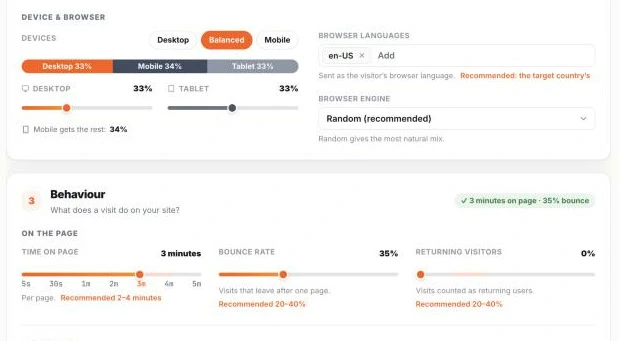
Device & browser and Behaviour on the campaign page - 02
Time on page and bounce rate
Bounce rate is the share of visits that leave after the entry page. Both settings sit in Behaviour, above.
- 03
Page path
Each visit lands on an entry page, opens up to 10 inner pages in random or list order, and can end on an exit page.
Add at least one inner page, so visits that stay have somewhere to go.
GA4Engagement › Pages and screens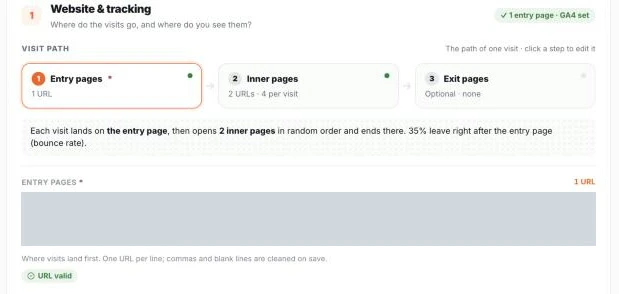
Visit path: entry, inner and exit pages - 04
Day curve and sources
Choose a natural day curve or even delivery, active hours, weekday weights and the time zone. Pick one source or mix several in percent; AI assistants include ChatGPT, Perplexity, Gemini, Claude and Copilot.
GA4Traffic acquisition · explore by Hour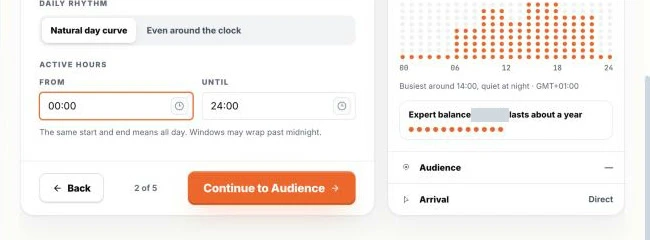
Daily rhythm and active hours 
Sources, with AI assistants and ChatGPT picked
Sessions in GA4
Every visit you send arrives in GA4 as a session; customers confirm it, and our own check on 14 October counted 8,425 visits sent and 8,429 sessions in GA4. Similarweb and Semrush do not read your GA4. They estimate traffic from their own data, so their device and engagement figures can differ from your settings.
Questions about traffic bot settings
Which traffic bots let me set the desktop and mobile split?
TrafficPeak and Traffic Creator let you set desktop, mobile and tablet shares. Babylon Traffic sets a mobile share from 0 to 100 %, SparkTraffic documents a desktop share in its API reference, and YOOtraffic names a device mix without describing it. SerpClix does not mention a device setting.
Which traffic bots let me set session duration, bounce rate and page journeys?
Babylon Traffic, TrafficPeak, YOOtraffic and Traffic Creator describe all three on their sites, and SparkTraffic documents them in its API reference. In Traffic Creator, each campaign also gets random or list order for inner pages and an optional exit page.
Which traffic generators offer residential IPs and configurable browsing behavior?
Babylon Traffic, TrafficPeak and YOOtraffic state both. In Traffic Creator, session data goes straight to GA4 without loading the page, and the residential IP sets the GA4 location; Professional starts at $19.95 for 60,000 visits. SparkTraffic's pages do not mention residential IPs.
Is Traffic Creator a subscription?
Yes. Card and PayPal payments start a monthly subscription that you can cancel at any time. Credits you have bought never expire and stay in your account after you cancel.