Short answer
SparkTraffic publishes low starting prices and exposes targeting, campaign and UTM controls. Our archived-demo walkthrough confirms visible settings, not delivered traffic quality. Compare the billing unit, selected-plan features and reporting requirements before buying. We did not run a new delivery test, so this review does not assign a traffic-quality score.
- Starting price: Mini: $9.96 per month for 60,000 credits, observed October 9, 2026.
- What we observed: Targeting, daily-volume, event and UTM fields in the real Chrome interface.
- What remains unverified: IP origin, selected-plan entitlement, delivery quality and GA4 outcomes.
- Our perspective: Traffic Creator is our own competing product. We previously resold SparkTraffic.
What we reviewed in the SparkTraffic demo
We inspected an existing Free Demo project in Google Chrome on October 9, 2026. The project was archived, had no website-traffic credits and displayed zero delivered hits. We recorded the interface without activating the project, restoring the campaign or saving settings.
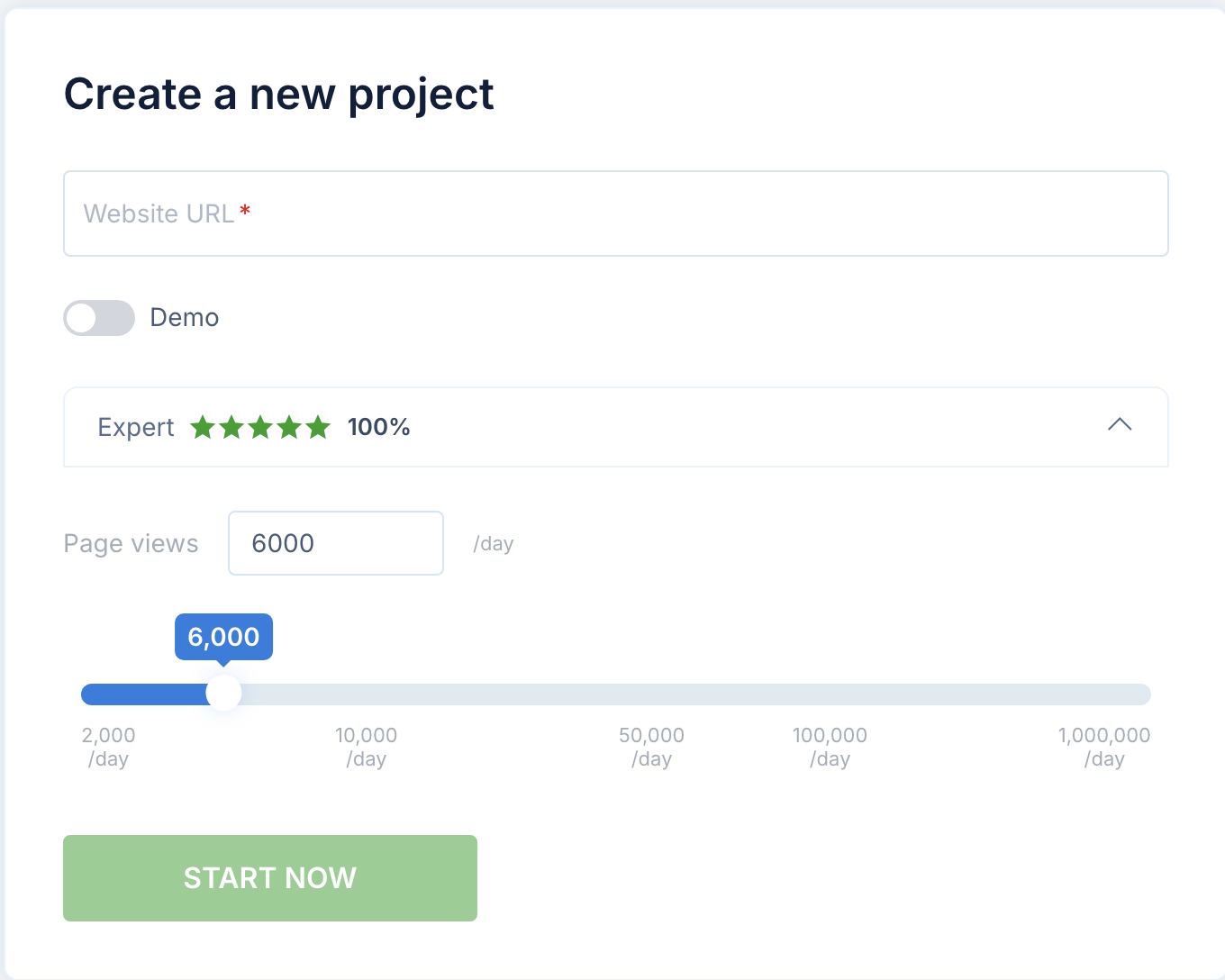
This is an interface walkthrough and a review of public materials. It is not a fresh paid traffic benchmark. The recorded walkthrough shows which controls were visible in that account. The updated screenshots show public pricing and the separate, unsubmitted setup form; neither establishes how a paid campaign would perform or which settings are included in every tier.
Watch the SparkTraffic dashboard walkthrough
Watch the review on the Traffic Creator YouTube channel. The 3-minute 28-second video contains real Chrome recordings of the same archived demo and explains the limits of the evidence.
The review is by Martin Freiwald, founder of Traffic Creator. Readers can also inspect our SparkTraffic alternative page and Traffic Creator pricing. Those pages describe our offer; they do not replace the evidence in this walkthrough.
Found a factual error or a changed offer? Contact our team with the relevant source so we can check and correct the review.
SparkTraffic pricing: compare credits before visits
SparkTraffic's public offer listed Mini at $9.96 per month for 60,000 credits when captured on October 9, 2026. We also recorded Large and Ultimate. The monthly total and allowance are the clearest starting points for a price comparison.
| Monthly plan | Published allowance | Monthly total | Calculated price per 1,000 credits |
|---|---|---|---|
| Mini | 60,000 credits | $9.96 | $0.166 |
| Large | 500,000 credits | $57.96 | $0.11592 |
| Ultimate | 10,000,000 credits | $699.96 | $0.069996 |
These calculations divide the advertised monthly total by the credit allowance. They are not independently measured costs per verified visit. The vendor displays some rounded per-thousand rates differently; use the totals above when checking the arithmetic.
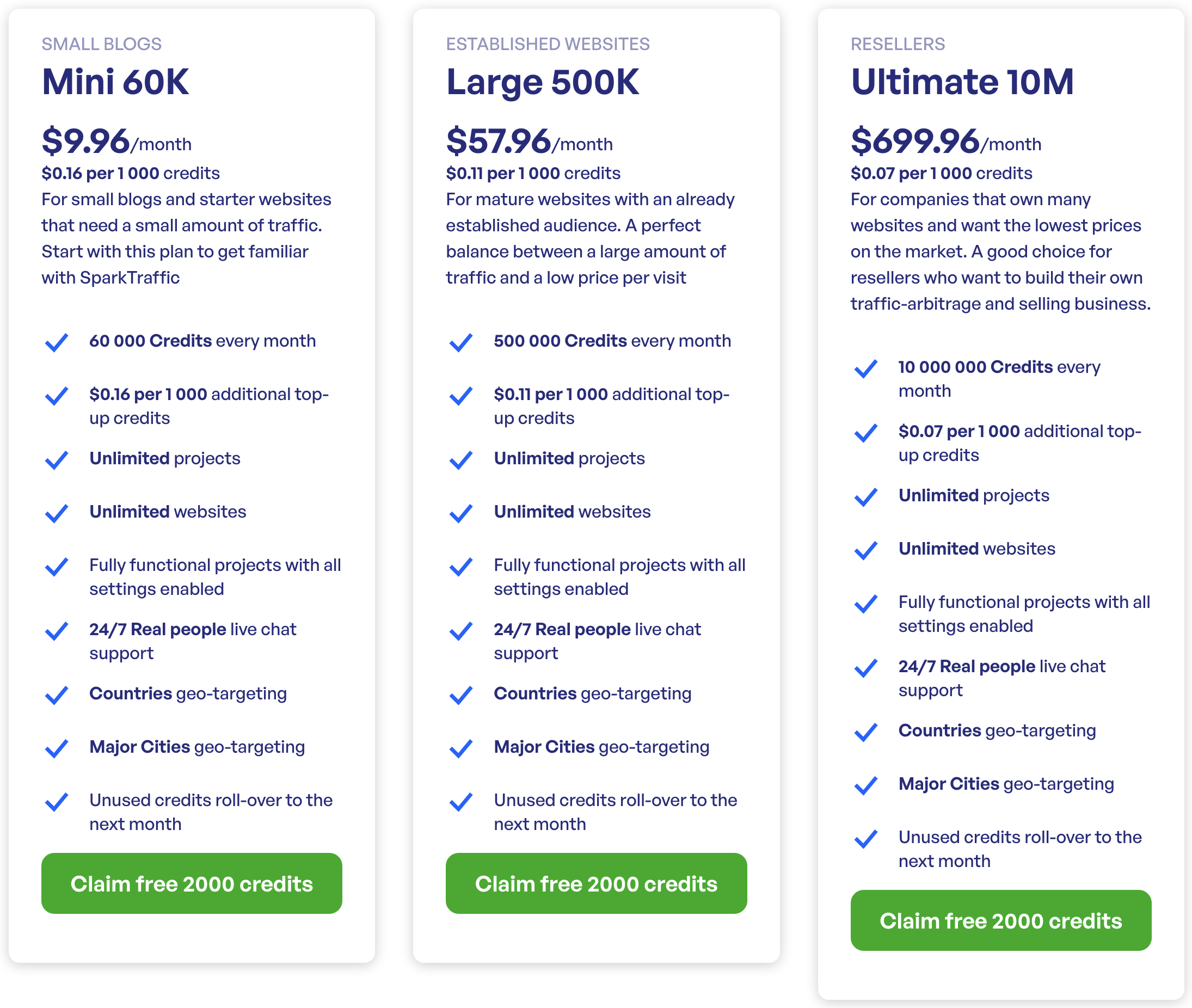
Before comparing providers, establish what one credit buys in the configuration you intend to use. Ask how multiple pages, configured actions or other options affect usage. A headline credit allowance should not automatically be described as the same number of verified delivered visits.
SparkTraffic also advertises a 2,000-credit free-demo offer. That offer is separate from the state of our captured account: our existing demo had no credits available. We did not replenish it or start a new campaign for this review.
The settings visible in our captured account
The recorded dashboard exposed targeting, device and language settings, daily-volume controls, event fields and UTM fields. The table separates an observed control from an outcome that would require delivery evidence.
| Setting | Evidence in the walkthrough | What still needs checking |
|---|---|---|
| Country and city targeting | Targeting fields visible in the interface | Selected-plan availability and actual delivered locations |
| Device distribution | Device fields and percentages visible | Delivered device mix against your requirements |
| Language | Language control visible | Selected-plan availability and delivered behavior |
| Daily volume | Daily-volume control visible | Pacing across the required delivery window |
| Event controls | Event fields visible in the account | Resulting events in your own implementation |
| UTM tagging | UTM fields visible in the advanced section | Tags preserved and recorded by analytics |
| Project reporting | Dashboard visible, zero delivered hits | Counts and reporting for a separately authorized campaign |
These observations update the older public-page-only comparison. In particular, UTM and event fields were seen in the authenticated account. They should not be described as absent because an earlier review did not find them on the homepage.
A visible control does not prove plan entitlement or successful execution. Confirm both for the plan you intend to buy. Our geo-targeted traffic guide provides related context for defining location requirements before a test.
UTM fields help attribution, not proof of human traffic
SparkTraffic's captured advanced section included utm_source, utm_medium and utm_campaign fields. Campaign tags help identify traffic in reports when the destination and analytics implementation record them correctly. Google's campaign URL guidance explains the campaign parameters and their reporting purpose.
We did not capture a fresh GA4 delivery report. This review therefore does not assert that SparkTraffic visits appeared as direct traffic, referral traffic or a particular engagement result. Without UTM parameters, attribution depends on other information, including the referrer and analytics setup; it is not always direct.
For an authorized test, use an identifiable naming convention and keep synthetic sessions separate from customer acquisition and organic-demand reports. A test campaign name might distinguish provider, configuration and date. It should tell a colleague what the sessions represent without implying new customer demand.
UTM tags do not prove that visitors are human. The presence of an event field likewise does not establish that real people performed those actions. Configuration, analytics recording and audience authenticity are separate questions.
How to define a delivery test without overclaiming
The archived demo supplied no new traffic for a delivery test. If a separate test is appropriate, write the requirements first: target pages, allowed locations, devices, delivery window, required actions and accounting unit. Ask the provider to confirm what the selected plan supports.
Review observed session lengths, devices, timing, locations and interactions against that brief. These checks can reveal mismatches. They are diagnostics, not proof that all visitors are human, and there is no universal engagement percentage that settles every campaign's quality.
IP source requires separate evidence. Neither a low price nor a dashboard label establishes residential or datacenter origin. This review does not identify the IP provenance of the cheap tiers. Ask what your chosen plan promises and how that promise can be checked.
AdSense: synthetic sessions must not create ad activity
Google's AdSense Program policies prohibit artificial ad impressions and clicks and identify restricted traffic sources. The policy also discusses publishers using online advertising. “All paid traffic is prohibited” is therefore too broad a description of the rule.
For synthetic testing, choose a destination that does not load ads. Check the actual page and its scripts, rather than relying on a traffic provider's “safe” label. A noindex directive controls search indexing; it does not certify AdSense compliance or prevent ad impressions.
This review does not certify SparkTraffic, Traffic Creator or any configuration as approved by Google. The product's controls and the destination's behavior both matter. A synthetic test should remain identifiable as a test in your logs and reporting.
SparkTraffic versus Traffic Creator: use the same brief
Traffic Creator is our competing service. The walkthrough does not establish a side-by-side performance advantage. It supplies a dated view of SparkTraffic's controls and a framework for asking comparable questions about both products.
| Buying question | What to compare across providers |
|---|---|
| What am I buying? | Billing unit, allowance, campaign consumption and delivery accounting |
| Can I configure the required visit? | Pages, devices, locations, language, timing and actions available in the selected plan |
| Can I identify the test in reports? | Campaign tags, referrers, destination instrumentation and separation of synthetic data |
| What happens at the destination? | Analytics behavior, ad loading and other scripts triggered by the visit |
| What evidence settles the result? | Delivery records and observations against the original requirements |
If our product is on your shortlist, read the Traffic Creator alternative comparison and confirm current features and terms. If SparkTraffic's published pricing and available controls suit the brief, it deserves consideration too. The choice should follow the requirements and evidence, not an unsupported star score.
Frequently asked questions
Did you run a paid SparkTraffic delivery test?
No. We inspected an existing archived Free Demo account on October 9, 2026. It had no credits and showed zero delivered hits. We did not activate the campaign or save settings. The review establishes visible controls and dated public pricing.
Does SparkTraffic have UTM tagging?
UTM source, medium and campaign fields were visible in the captured account. We did not verify their availability in every paid tier or their effect on delivered sessions. Confirm the selected plan and your analytics implementation before relying on them.
Are SparkTraffic's cheapest visits residential?
We have not verified their IP origin. Price and visible controls cannot establish residential or datacenter provenance. Ask the provider for evidence about the specific plan you are evaluating.
How much does SparkTraffic cost?
The monthly offer captured on October 9, 2026 listed Mini at $9.96 for 60,000 credits, Large at $57.96 for 500,000 and Ultimate at $699.96 for 10 million. Check the current offer and distinguish credits from delivered visits.
Is SparkTraffic safe for AdSense?
No provider should be treated as inherently approved. Google prohibits artificial ad impressions and clicks. Keep synthetic tests away from destinations that load ads. Noindex is not an ad-policy safeguard.
Does this review prove an SEO ranking benefit?
No. It contains no ranking experiment or performance comparison. Visible settings and an analytics dashboard do not establish a ranking benefit or real customer demand.
Our verdict
Use the walkthrough to compare pricing and configuration, then define what remains to be verified. SparkTraffic's published offer and visible controls can help build a shortlist. Delivered quality, IP provenance and GA4 outcomes need their own evidence. We disclose our competing product and keep those unmeasured outcomes out of the verdict.