Traffic Creator, Babylon Traffic and SigmaTraffic are three SparkTraffic alternatives with different strengths. Traffic Creator offers country-targeted website visits from $19.95 for 60,000 visits and separate Google Search Console campaigns from $29/month for 500 search credits, with no bonus credits. Country, city and state use the same search-credit price. Babylon Traffic offers scripted visits from $39/month plus 50 free test visits. SigmaTraffic provides a free entry plan and paid hit-based packages.
For search traffic, this guide also compares SparkTraffic’s SEO credits, TrafficBot and SERP Empire. Use the provider calculator to compare plans for your volume, targeting and features, or go straight to the current search prices.
Watch: three SparkTraffic alternatives compared
A 3-minute comparison of Traffic Creator, Babylon Traffic and SigmaTraffic, including our separate Google Search Console traffic offering.
Download the comparison video.
Website traffic vs. Google search traffic: which should you choose?
Website traffic: visits and on-site analytics. Choose website traffic for visit volume, pageviews and engagement reporting in Google Analytics. These campaigns do not require a Google keyword search or result click, so extra website visits alone are not a keyword-ranking strategy. Similarweb estimates traffic using its own data sources; purchased visits do not guarantee a change in its figures.
Google search traffic: keyword and CTR campaigns. Search traffic follows a keyword search, Google result click and website visit. It is the search-focused option for keyword engagement and SEO goals. Monitor clicks, impressions, CTR and average position in Search Console. Traffic Creator offers these campaigns separately, with dedicated SEO credits and keyword, URL and audience settings.
Google Analytics can record visits from both sources. Google describes aggregated search-interaction data as an input to relevance assessment, but this does not establish that purchased or automated clicks improve rankings.
Read the video transcript
Looking for a SparkTraffic alternative? Start with the feature you need, rather than the biggest traffic number. This quick comparison covers Traffic Creator, Babylon Traffic, and SigmaTraffic. We publish the article at Traffic Creator, so this is our comparison of published features and prices, not an independent delivery test.
Traffic Creator is a fit when targeting and campaign controls matter. Professional starts at nineteen dollars ninety-five for sixty thousand visits, with country targeting. Expert starts at twenty-seven dollars ninety-five and adds city and state targeting, GA4 events, and an automatic crawler. Purchased website credits do not expire. Card payments renew until cancelled, so check the billing terms.
We also offer Google Search Console traffic through dedicated search campaigns. These use a target keyword and page URL, with audience and delivery settings, and a separate SEO credit balance. This is a different product from ordinary website visits. Review the actual clicks, impressions, and click-through rate in your own Search Console reports. Campaign totals and Google reporting can differ. Ranking improvements are not guaranteed, and Google restricts automated search queries without express permission.
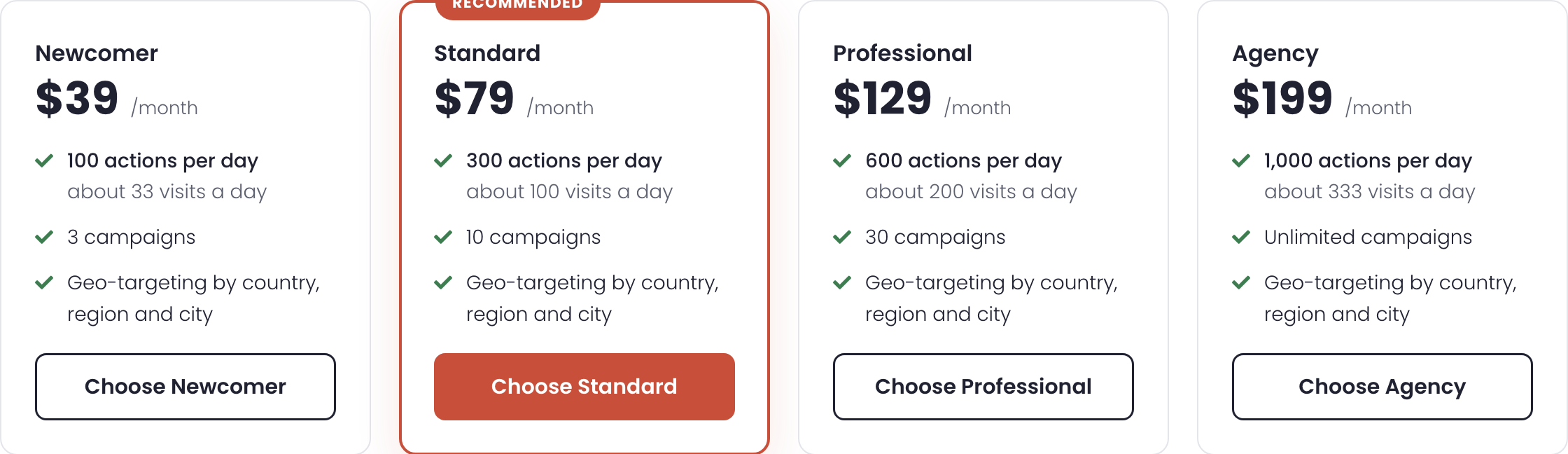
Babylon Traffic stands out for configurable browsing scenarios. You can build sequences of navigation and waiting actions. The Newcomer plan in our pricing capture is thirty-nine dollars a month, with one hundred actions a day and three campaigns. Actions are the key unit: a multi-step visit can consume several actions. Compare the cost of your complete sequence, not just the allowance headline.
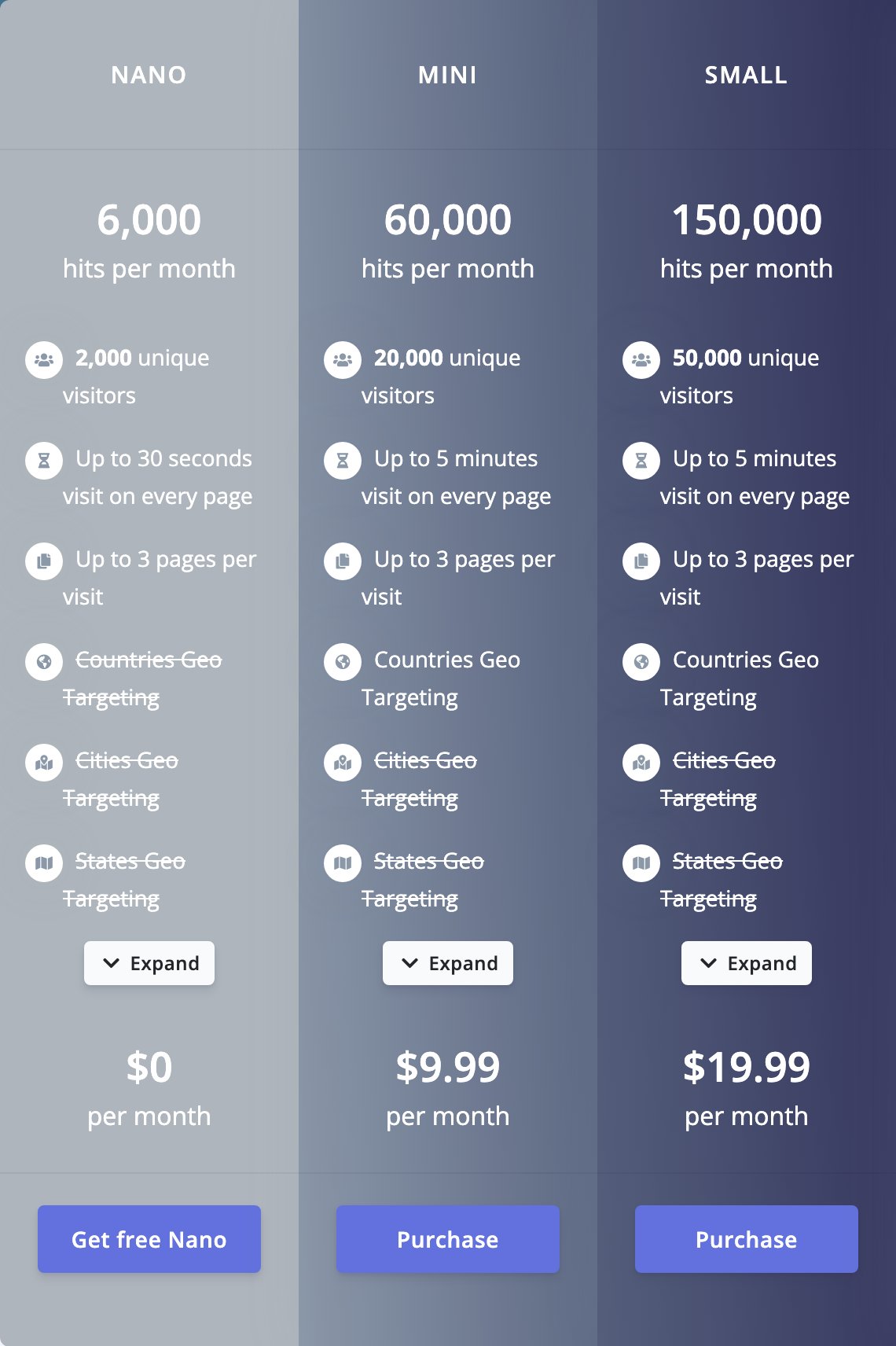
SigmaTraffic offers a free Nano plan as an entry point, without geographic targeting. Mini is nine dollars ninety-nine a month and lists sixty thousand hits, including twenty thousand advertised unique visitors, with country targeting. City and state targeting starts on Medium at twenty-nine dollars ninety-nine. The distinction matters: a hit allowance is not the same thing as a unique visitor allowance.
SparkTraffic Mini provides our reference point at nine dollars ninety-six a month for sixty thousand credits. Credit use depends on the campaign settings. Across these services, credits, visits, actions, and hits are different units. Match your targeting, browsing sequence, delivery window, and reporting needs first. Then compare what that specific campaign would cost. The website visit prices shown here do not price Traffic Creator’s separate Search Console product.
Choose Traffic Creator for its targeting options and separate Search Console traffic offering. Consider Babylon when you need configurable action sequences, or SigmaTraffic when a free starting point and monthly hit packages suit your use case. Continue reading the article for the source links and pricing screenshots. Check current checkout terms before ordering.
Find the traffic provider for your needs
Compare Traffic Creator, SparkTraffic, SigmaTraffic, Babylon Traffic, SERP Empire and TrafficBot by volume, location targeting, features and budget. The calculator accounts for credits, hits and daily actions, with a separate Google Search Console traffic estimate.
Open the interactive provider and price calculator. USD prices checked 10 October 2026; published by Traffic Creator. Estimates use documented listed plans and can recommend a competitor.
Google Search Console traffic: current prices
Search traffic is a separate product from ordinary website visits. The calculator uses these USD prices checked on 10 October 2026. Compare the amount you pay for a covering pack or subscription; provider credits, searches and actions are different units, and Google-reported clicks can differ.
| Provider | Entry price (USD) | Allowance and billing |
|---|---|---|
| Traffic Creator | $29.00/month | 500 monthly search credits; no bonus. Country, city and state use the same tariff. Annual and two-year plans are paid upfront. |
| SparkTraffic | $29.96 | 200 SEO credits with subscribe-and-save. One-time purchase costs more; temporary promotional bonuses are excluded. |
| TrafficBot | $59.00/month | 500 searches/month. A related Traffic Creator brand using its engine and SEO wallet. |
| SERP Empire | $79.00/month | 500 searches/month; city targeting included. State-wide targeting needs confirmation. |
| Babylon Traffic | $39.00/month | 100 actions/day. Google keyword search and Search Console visibility advertised;50 free test visits, no credit card. |
| SigmaTraffic | Search quote not verified | Its website hit/visitor plans are compared separately; no dedicated GSC click price verified. |
Babylon’s free trial: the official offer is 50 free test visits, without a credit card. It is a one-time trial, not 50 guaranteed Google-reported clicks or a recurring free allowance. Its paid plans charge for page openings, clicks, waiting and other actions. Adjust “Actions per search visit” in the calculator for your campaign; the default 3 is an estimate. At 1,500 visits over 30 days and 3 actions each, daily demand is 150 actions and Standard at$79/month covers it. At 7 actions each, demand becomes 350 actions/day and Professional at$129 is needed.
SparkTraffic SEO credits: its cart tooltip explicitly describes visitors appearing in Search Console. The rounded per-visit figures in the screenshot do not reproduce exact package totals:200 credits cost$29.96, rather than 200 ×$0.149. These totals use the subscribe-and-save option; the cart displayed$3,999.96 for 150,000 credits subscribed versus$4,444.40 for a one-time purchase. Country targeting is documented; city/state search support needs confirmation.
All Traffic Creator monthly search plans
| Search credits/month | Monthly USD | Annual upfront USD | Two-year upfront USD |
|---|---|---|---|
| 500 | $29.00 | $319.00 | $609.00 |
| 1,000 | $55.00 | $605.00 | $1,155.00 |
| 2,500 | $124.00 | $1,364.00 | $2,604.00 |
| 5,000 | $239.00 | $2,629.00 | $5,019.00 |
| 10,000 | $459.00 | $5,049.00 | $9,639.00 |
| 25,000 | $1,099.00 | $12,089.00 | $23,079.00 |
| 50,000 | $2,099.00 | $23,089.00 | $44,079.00 |
| 100,000 | $3,899.00 | $42,889.00 | $81,879.00 |
All SparkTraffic SEO subscription packs
| SEO credits | Exact pack price (USD) |
|---|---|
| 200 | $29.96 |
| 750 | $74.69 |
| 2,000 | $169.96 |
| 5,000 | $369.96 |
| 20,000 | $1,199.96 |
| 100,000 | $2,996.96 |
| 150,000 | $3,999.96 |
TrafficBot and SERP Empire monthly search prices
| Searches/month | TrafficBot (USD/month) | SERP Empire (USD/month) |
|---|---|---|
| 500 | $59.00 | $79.00 |
| 1,000 | $111.00 | $139.00 |
| 1,500 | $159.00 | $199.00 |
| 2,500 | $239.00 | $299.00 |
| 3,500 | $319.00 | $399.00 |
| 5,000 | $399.00 | $499.00 |
| 7,500 | $559.00 | $699.00 |
| 12,500 | $799.00 | $999.00 |
| 20,000 | $1,199.00 | $1,499.00 |
| 30,000 | $1,599.00 | $1,999.00 |
| 50,000 | $2,399.00 | $2,999.00 |
| 100,000 | $3,999.00 | $4,999.00 |
| 250,000 | $7,999.00 | $9,999.00 |
| 500,000 | $14,399.00 | $17,999.00 |
All Babylon monthly action plans
| Plan | Actions/day | USD/month |
|---|---|---|
| Newcomer | 100 | $39.00 |
| Standard | 300 | $79.00 |
| Professional | 600 | $129.00 |
| Agency | 1,000 | $199.00 |
| Premium 2 K | 2,000 | $349.00 |
| Premium 3 K | 3,000 | $499.00 |
| Premium 5 K | 5,000 | $799.00 |
| Premium 10 K | 10,000 | $1,499.00 |
| Premium 15 K | 15,000 | $2,249.00 |
SparkTraffic alternatives: prices, units and controls
The table compares three alternatives against a SparkTraffic baseline. For example, SigmaTraffic Mini's 60,000 monthly hits include 20,000 advertised unique visitors, while SparkTraffic Mini lists 60,000 credits. Those numbers describe different allowances. Prices below are the USD amounts visible in our Chrome session, with the official pages linked in each row.
| Provider and plan | Displayed price | What it includes | Published controls | Consider it for |
|---|---|---|---|---|
| SparkTraffic Mini 60K baseline | $9.96/month | 60,000 credits/month; credits per visit depend on settings | Country and major-city targeting; mobile and desktop | A credit-based baseline. Official plan page |
| Traffic Creator Professional | From $19.95; card renewal follows the selected billing interval | 60,000-visit entry package; purchased credits do not expire | Country targeting; Expert adds city/state targeting and a crawler | Choosing a targeting tier. Official pricing |
| Babylon Traffic Newcomer | $39/month in Chrome | 100 actions/day; 3 campaigns | Country, region and city; configurable visit paths | Scripted journeys with an action budget. Official pricing |
| SigmaTraffic Mini | $9.99/month | 60,000 hits/month; 20,000 advertised unique visitors | Country targeting; up to 3 pages/visit and 5 minutes/page | A monthly hit-based allowance. Official pricing |
SparkTraffic is not limited to monthly subscriptions: its linked page also advertises a one-time credit option. Its Mini price comes from that particular product page, not every SparkTraffic plan. For the pricing screenshots and interface walkthrough, see our updated SparkTraffic review.
Which SparkTraffic alternative fits your project?
Start with the requirement that would rule a provider out. A city-specific project needs a plan that actually includes city targeting. A scripted three-step journey needs enough actions to finish each visit. A small reporting experiment needs a clear traffic label. The published plan pages above establish the available options; they do not prove which service will deliver your best result.
Traffic Creator: compare Professional with Expert
Traffic Creator's current pricing page lists Professional from $19.95 and Expert from $27.95 for 60,000 visits. Professional includes country targeting. Expert adds city/state targeting, premium residential networking, advertised GA4 natural events and an automatic website crawler.
Choose it when: the distinction between country-level and more precise targeting matters to your project. Check the actual available locations and campaign settings before buying. Event counts are a reporting feature, not evidence that the visits represent prospective customers.
Watch the billing terms: although pricing cards say “single credit pack,” the page and its subscription FAQ explicitly state that card payments renew at the selected billing interval until cancelled. Purchased credits are described as non-expiring. Review the payment method and renewal interval at checkout; do not assume every purchase is a one-off payment. See our terms of service and refund policy.
Babylon Traffic: budget for each step of a visit
Babylon's Newcomer plan shows 100 actions per day and three campaigns. Its feature documentation describes visits that follow a defined path: opening pages, waiting, clicking links or filling forms. Country, region and city targeting are listed, alongside mobile/desktop settings and scheduling.
Choose it when: you need to describe a sequence of interactions rather than just a visit count. Reserve it for sites and test environments you control. Automated form submissions should not enter real lead, purchase or customer-account workflows.
Watch the allowance: waiting and navigation can consume separate actions. More steps mean fewer completed journeys from the same plan. Babylon's pricing FAQ says excess configured actions reduce campaign delivery proportionally. It also describes month-to-month billing and cancellation from the subscription page; check refund terms separately.
SigmaTraffic: a free plan, with paid targeting options
SigmaTraffic's Nano plan lists 6,000 hits and 2,000 unique visitors per month at $0, with up to 30 seconds per page. Its country, city and state targeting entries are crossed out. Mini adds country targeting; the $29.99/month Medium tier lists city and state options.
Choose it when: a free entry plan or a monthly hit allowance matches your experiment. The setup guide requires the website to be accepted before a free project is created. It also describes dayparting and returning-visitor settings for paid plans. We have not tested acceptance or delivered traffic for this comparison.
Watch the terminology: a hit is not an additional unique visitor. Check renewal, cancellation and refund conditions before paying; this article does not treat an advertised free allowance as an unrestricted offer for every website.
How to compare credits, hits and actions
Divide the price by the allowance only after identifying the unit. SparkTraffic explicitly describes credits as a payment unit, and Babylon counts separate interactions as actions. Our calculations below use published allowances, not measured outcomes. They help compare capacity; they cannot tell you the cost of a real customer or an independently verified session.
- SparkTraffic Mini: $9.96 ÷ 60,000 × 1,000 ≈ $0.166 per 1,000 credits. At two credits per visit, a hypothetical 60,000-credit allowance covers 30,000 visits. Confirm your own settings' estimate.
- SigmaTraffic Mini: $9.99 ÷ 60,000 × 1,000 ≈ $0.167 per 1,000 advertised hits. Using its separate 20,000-visitor allowance gives about $0.50 per 1,000 advertised unique visitors. Neither calculation verifies human visitors.
- Babylon Newcomer: assuming three actions per completed journey, 100 actions/day allows roughly 33 journeys/day, or about 1,000 over a hypothetical 30-day month. At the captured $39 price, that is about $39 per 1,000 such journeys. More actions per journey reduce this capacity.
The cheapest displayed unit can therefore be the wrong unit for your project. Write down the minimum targeting, page path and timing requirements first. Then compare the cost of meeting those requirements, including renewal charges and any unused allowance.
What the comparison does and does not establish
The two new pricing screenshots establish what our browser displayed on 9 October 2026. They do not establish delivery quality. There are no comparable customer-conversion results or provider performance scores here. Our recommendation is about published controls and billing fit; a delivery recommendation would require a separately designed, authorized test.
Google Analytics can report campaign labels and events without proving that a session came from a human customer. If you conduct an authorized test, use a distinct source, medium and campaign name, following Google's campaign URL documentation. Keep test traffic separate from your normal acquisition reporting. Our GA4 bot-filter guide explains the reporting context.
For search growth, measure real search clicks separately in Search Console. Buying or simulating visits is not evidence of improved rankings. For sales, evaluate validated customer actions rather than configured browser events. None of these providers should be chosen from this article as a proven source of buyers.
Do not use generated visits to inflate advertising impressions or clicks. Google AdSense's program policies prohibit artificial activity and certain paid-to-click traffic sources. Choose an ad-free page you control for legitimate testing and review the relevant platform rules first.
Our recommendation: shortlist Traffic Creator for tier-based targeting, Babylon Traffic for scripted journeys, and SigmaTraffic for a free or monthly hit-based experiment. Keep SparkTraffic on the shortlist if its credit model and controls already meet your needs. Make the final choice from the actual campaign estimate and checkout terms, not a universal “best provider” label.
Frequently asked questions
Which SparkTraffic alternative has a free plan?
SigmaTraffic publishes a $0 Nano plan with 6,000 monthly hits, subject to website acceptance. Babylon Traffic advertises 50 free test visits. SparkTraffic's linked page advertises 2,000 free credits. These are different units and eligibility conditions; a free allowance does not prove delivery quality.
Does Traffic Creator require a subscription?
The current Traffic Creator pricing FAQ says card payments create a subscription that renews at the chosen billing interval until cancelled. Its cards also describe credit-pack volumes. Check the payment method and checkout terms together; do not interpret the pack label as a guarantee of non-recurring billing.
Is Babylon Traffic's action limit a visitor limit?
No. An action is one interaction, such as opening a page or waiting. One visit can use several actions. A three-action journey consumes three units, so 100 actions per day supports roughly 33 such journeys, assuming the full allowance is used for that path.
Is the lowest price per hit the best value?
Only if hits are the unit your project needs. Compare targeting, complete journeys, timing, renewal and measurable results. A low hit price cannot establish a low cost per customer. We have not run delivery or conversion benchmarks for this comparison.
Sources and further reading
Official pages were checked on 9 October 2026. The screenshots record the browser's display at capture time; current plan pages and checkout terms take precedence over a saved image.
- SparkTraffic: product plans and credit definition
- Traffic Creator: tiers, prices and subscription FAQ
- Babylon Traffic: pricing and action definition; visit controls
- SigmaTraffic: monthly plan allowances; free-plan eligibility and setup
- Google Analytics: campaign URLs; Google AdSense: program policies
Need the interface context before choosing? Read the SparkTraffic review with current screenshots. If Traffic Creator's targeting tiers fit your requirements, review the current plans and billing terms.