
Learn how Similarweb calculates Global Rank and discover actionable, data-driven strategies to boost your Similarweb traffic metrics safely with residential IP traffic.
Introduction
If you are running a digital business, your Similarweb Global Rank is more than just a vanity metric. Investors, advertisers, and competitors use Similarweb to benchmark your market position. A low rank can cost you advertising deals, while a high rank establishes you as an industry leader in your specific vertical.
But how exactly does Similarweb calculate this rank, and more importantly, how can you increase your Similarweb rank quickly and safely without triggering anomaly detection systems?
In this technical guide, we will break down the absolute mechanics of the Similarweb algorithm as it stands in 2026. We will explain the data sources Similarweb relies on, how traffic is estimated (and why it often differs from your own Google Analytics), and the exact engineering steps you can take to boost your Similarweb traffic metrics using programmatic behavioral simulation.
How Does Similarweb Calculate Global Rank?
To improve your Similarweb ranking, you first need to understand how the platform collects and processes data. Similarweb is not directly plugged into your Google Analytics account (unless you explicitly connect it). Instead, it relies on a multi-layered data collection approach.
Similarweb Global Rank is a relative metric that compares your website's estimated traffic and engagement against every other website in their massive database.
Similarweb calculates this rank using four primary data pillars:
- Direct Measurement: Data from websites that connect their Google Analytics directly to Similarweb. This provides a deterministic baseline for their machine learning models to anchor against.
- Contributory Network (The Panel): Anonymous traffic data collected from millions of consumer devices worldwide with specific browser extensions installed. This is the core of their third-party estimation.
- Partnerships: Data acquired from Global ISPs (Internet Service Providers) and specialized measurement companies.
- Public Data Extraction: Billions of data points scraped from the public web every month to monitor referring links, social signals, and structural SEO data.
The platform feeds these complex data points into machine learning models to estimate your total monthly visits, bounce rate, pages per visit, and average visit duration. Your Global Rank is then calculated based on the aggregate of these metrics compared to the global web landscape.
Pro Tip
Because Similarweb relies heavily on panel data (browser extensions), it tends to aggressively underestimate traffic for sites with highly technical audiences (who utilize strong privacy tools like Pi-hole or uBlock Origin) and smaller websites with under 50,000 monthly visits.
Proven Strategies to Increase Similarweb Rank
Improving your Similarweb ranking requires a combination of genuine marketing efforts and a deep understanding of how traffic is programmatically measured by third parties. Here are the most effective strategies to deploy.
1. Connect Your Google Analytics (The Fastest Method)
If Similarweb is severely underreporting your traffic compared to what you see internally, the fastest way to improve your Similarweb traffic metrics is to explicitly connect your Google Analytics 4 (GA4) account to their platform.
When you verify your site and connect your analytics, Similarweb uses your actual deterministic data rather than relying on their estimation models. This almost always results in an immediate correction and subsequent improvement of your Global Rank.
Important Warning
Connecting your GA4 is a double-edged sword: you will be exposing your True bounce rate, time-on-site, and internal conversion metrics to anyone using the Similarweb Pro platform. Many startups intentionally leave their accounts disconnected to maintain operational secrecy from competitors.
2. Boost Direct Traffic Volume
Similarweb weights "Direct" traffic incredibly heavily because it signals phenomenal brand strength and a loyal user base. Direct traffic implies the user bypassed search engines entirely and typed your URL straight into their browser window.
To increase your direct traffic profile:
- Run offline marketing campaigns (podcasts, billboards) that force users to type your URL manually.
- Build a strong newsletter list. Email clicks without UTM parameters are often categorized as Direct traffic by third-party tracking.
- Utilize advanced traffic tools like Traffic Creator. Our Modus Engine can generate thousands of highly realistic, residential IP visits that register explicitly as Direct traffic in major analytics platforms.
Traffic estimation models comparison
3. Improve Engagement Metrics (Time on Site & Pages/Visit)
A high volume of incoming traffic with a 95% bounce rate will not significantly improve your Global Rank. Similarweb factors in engagement heavily, as it dictates the quality of the digital property. Let's look at how to optimize this.
4. Leverage Residential IP Traffic Automation
Many site owners attempt to boost Similarweb ranking using cheap data center bots. As detailed in our ultimate guide to CTR manipulation, Similarweb's machine learning models effortlessly detect and filter out traffic originating from AWS, DigitalOcean, or known VPN subnets.
To successfully register traffic in Similarweb's panel data, visits must originate from real residential internet connections. Traffic Creator routes requests through 195+ countries using genuine consumer ISPs (like Comcast or Vodafone). This ensures the traffic looks mathematically identical to human browsing behavior, bypassing filtering algorithms.
Deployment Checklist
4 steps to successfully increase Similarweb metrics
Ensure your traffic provider utilizes Tier 1 ISPs, not datacenter hosting.
Match the IPs exactly to the target market where you need your Country Rank to improve.
Set a 60-120 second minimum visit timer to combat the native bounce rate.
Require the script to click internal links to trigger multiple pageviews per session.
The Technical Mechanics of Traffic Estimation
Let's dive deeper into how the Contributory Network functions at the server level. Similarweb's panel consists of millions of devices that have opted into data collection through various browser extensions (often quietly bundled with free VPNs, coupon finders, or ad blockers).
When you want to increase Similarweb traffic metrics, you need to ensure that the traffic navigating to your site is physically represented within this specific panel. Because the panel size represents only a tiny fraction of total internet users (estimated between 1% and 5%), extreme statistical extrapolation is required to generate the numbers you see on their dashboard.
If you generate 10,000 visits, but none of those users have a Similarweb-partnered extension installed, Similarweb records zero visits. Consequently, your extrapolated traffic remains unchanged. This is why high-volume, globally distributed traffic is strictly necessary to move the needle on third-party estimation platforms.

The architecture of data collection through proxy nodes and extension panels
Why Does My Similarweb Traffic Not Match Google Analytics?
This is the most common question founders ask. It is entirely normal for Similarweb estimates to differ from your internal GA4 data by a massive margin—sometimes 30% to over 50%.
The discrepancy happens because Google Analytics utilizes first-party data (a JavaScript snippet firing directly on your domain tied to a specific session ID), while Similarweb uses extrapolated third-party estimation models.
Furthermore, Google Analytics attempts to aggressively filter out known headless bots and automated traffic, whereas Similarweb's panel data might capture and extrapolate traffic that Google discards. If your goal is specifically to increase Similarweb rank for fundraising or valuation purposes, optimizing for panel visibility is a completely different technical challenge than optimizing for GA4 event firing.
How the Modus Engine Drives Panel-Visible Traffic
A critical strategy to boost Similarweb ranking is manipulating the "Channels" breakdown inside the Similarweb Pro dashboard. Similarweb categorizes traffic into Direct, Organic Search, Referral, Social, Mail, and Display Ads.
Direct traffic, as discussed, is the crown jewel. It implies brand strength. The Modus Engine, the proprietary automation infrastructure powering Traffic Creator, simulates exactly this type of engagement by initiating headless and non-headless browser sessions without HTTP referrer headers.
When you send 10,000 Direct visits via the Modus Engine, the technical flow looks like this:
- The engine checks out active residential IP nodes located in your target geography (e.g., Tier 1 countries like the USA, UK, or Germany).
- It launches real, fully-headed Chrome and Safari instances using Puppeteer/Playwright (not easily identifiable headless implementations prone to JavaScript fingerprinting).
- The automated browser explicitly navigates to your domain, executing full page loads. This includes downloading CSS, rendering images, and executing heavy JS payloads like React hydration.
- Internal pages are clicked via dynamic DOM interactions, generating a solid pages-per-visit ratio of 2.5 to 3.0.
Because these visits come from unique consumer broadband connections, they intersect perfectly with Similarweb's contributory network. A statistical percentage of these nodes will inevitably be running the underlying extensions that feed data back to Similarweb's machine learning models, pushing your Global Rank upward.
Advanced Campaign Strategy
You can run blended campaigns natively in Traffic Creator. Allocate 60% of your campaign volume to Direct traffic and 40% to Organic Search traffic stemming from specific Google Dorks. This creates a natural-looking, diverse traffic profile that will not trigger anomaly detection alarms in Similarweb.
Datacenter Traffic vs. Residential Simulation
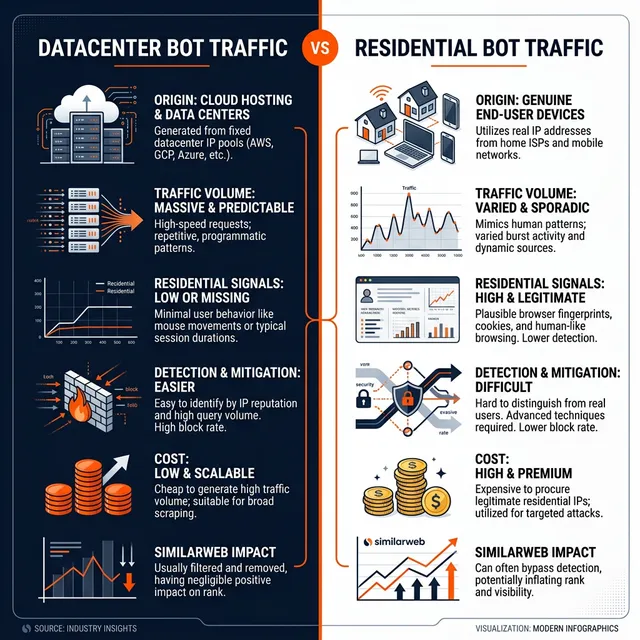
Many webmasters attempt to artificially increase Similarweb rank using cheap datacenter bots (like those found on Fiverr, Upwork, or low-end SMM panels). This is a critical engineering mistake that can cause irreversible harm to your domain's reputation score.
Here is a technical comparison of why residential traffic is the only viable path in 2026 for deceiving or manipulating third-party panel data metrics:
If you want your traffic metrics to register in third-party estimation tools in 2026, you must use residential proxies. Real IP addresses associated with ISPs are the only reliable way to penetrate the estimation panel without causing catastrophic damage to your site's SEO reputation.
Analyzing Your Competitors' Similarweb Data
You cannot simply improve Similarweb traffic metrics in a vacuum; you must understand your competitive landscape. Your Global Rank is relative. If your rank is 1,000,000, it means 999,999 websites have more estimated traffic and engagement than you.
To climb the rankings methodically, you need to dissect your competitors' traffic profiles using Similarweb's free or Pro tools.
Step 1: Identify the Traffic Mix
Look at your top three competitors. Are they getting 80% of their traffic from Organic Search while you only get 20%? If so, you have identified a content gap. You need to invest heavily in SEO or consider using a click-through rate (CTR) bot to simulate organic search clicks and boost your rankings on target keywords over a sustained 90-day period.
Step 2: Analyze Geographic Distribution
Similarweb provides a Country Rank alongside the Global Rank. This metric reveals where your competitors' audiences are located. If they dominate the US market, and your traffic is mostly from Southeast Asia, you understand why their Global Rank might be higher (Similarweb weights Tier 1 traffic heavily in certain estimation models due to panel density in the west).
With Traffic Creator, you can specifically target geographic regions down to the city level. By pointing residential traffic from US-based IPs to your website, you can actively manipulate your geographic distribution profile and drastically improve your Country Rank in Tier 1 geographies.
Step 3: Referral Traffic Opportunities
Under the "Referrals" tab, Similarweb lists the exact domains sending traffic to your competitors. These are essentially pre-qualified link-building targets. Reach out to these referring domains and pitch guest posts or banner placements to steal a slice of your competitors' traffic flow.
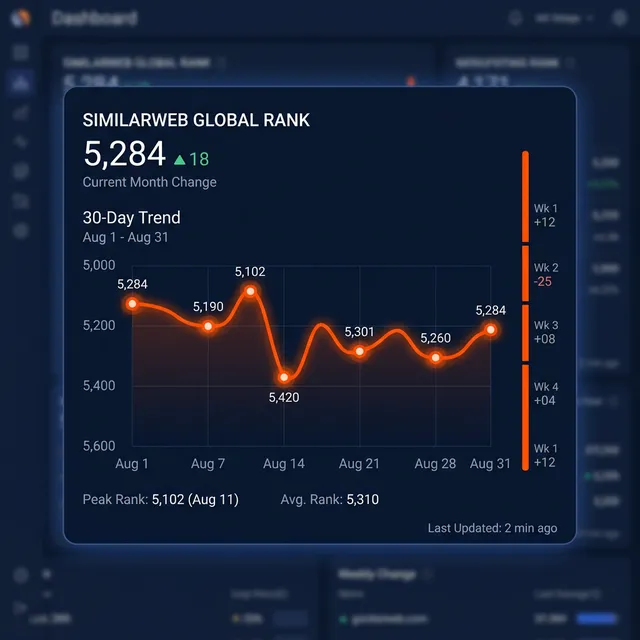
Analyzing competitor traffic distribution by channel and geography to identify optimization gaps.
Advanced Strategy: The "Bounce Rate Hack"
Similarweb penalizes websites with abnormally high bounce rates (typically above 80%). A high bounce rate signals to their algorithms that the website offers a poor user experience, which negatively impacts engagement metrics and, consequently, sends your Global Rank plummeting.
If your organic bounce rate is hovering around 85% because you run a single-page application (SPA) or a blog where users read one article and leave, you are at a structural disadvantage compared to multi-page media networks.
You can artificially dilute this bounce rate using a highly configured traffic campaign. By sending automated residential traffic that is explicitly programmed to visit a minimum of 2 pages per session with a 60-second delay between clicks, you inject millions of high-engagement data points into the ecosystem.
This mathematically forces your aggregated bounce rate down. Over a 30-day monitoring period, Similarweb's panel data will absorb this behavioral shift, leading to a much stronger engagement profile in the next monthly update cycle. Watch your rank jump accordingly.
FAQ
How often does Similarweb update its Global Rank?
Similarweb updates its primary traffic estimates and Global Rank once a month, typically between the 5th and the 10th day of the following month for the previous month's data. Pro users have access to daily and weekly estimations, but the authoritative public ranking is a monthly metric.
Can buying traffic increase my Similarweb ranking?
Yes, but only if the traffic is generated via residential IPs that intersect with Similarweb's contributory network. Cheap data center traffic will be filtered out by their machine learning models and will not positively impact your rank. In fact, it may flag your domain for anomaly suppression.
What is a good Similarweb Global Rank?
A rank under 1,000,000 means a site has notable, consistent traffic. A rank under 100,000 indicates a highly successful, high-traffic digital property with strong brand presence. Sites in the top 10,000 are typically major enterprise platforms, established SaaS tools, or viral publishers.
Does connecting Google Analytics to Similarweb help my SEO?
No. Connecting your GA4 to Similarweb only verifies your traffic data publicly on the Similarweb platform to resolve discrepancies. It has absolutely zero impact on Google's search algorithms or your organic SEO rankings. Google does not consume Similarweb data.
Why did my Similarweb rank drop suddenly?
A sudden drop is usually caused by an algorithm update within Similarweb's estimation model overriding historical patterns, a decline in your mobile app traffic (if tracked), or a seasonal dip in search volume for your core baseline keywords. It can also happen if a competitor runs a massive paid acquisition campaign during the month, pushing the entire ecosystem downwards relative to their new massive spike.
How does Similarweb measure mobile traffic vs desktop traffic?
Similarweb separates desktop and mobile web traffic explicitly. The contributory network spans both desktop browser extensions and mobile apps containing partner SDKs. If you are generating desktop-only bot traffic but your organic audience is 90% mobile, the discrepancy may trigger algorithmic filtering. Traffic Creator supports both desktop and mobile user agents, allowing you to mimic your site's natural device distribution perfectly.
Is it safe to use Traffic Creator with AdSense?
Yes. Traffic Creator's Modus Engine relies exclusively on residential IPs and human-emulated browsing behavior (pausing, scrolling, internal link clicking). Because the network fingerprint matches organic traffic exactly, it is generally considered safe for platforms like Google AdSense. However, if your primary goal is to boost Similarweb ranking, we heavily recommend isolating campaigns targeting estimation panels from aggressive ad-click campaigns to minimize risk.
Conclusion: Engineering Your Global Rank
Improving your Similarweb ranking is a strategic lever for improving your company's valuation, negotiating better partnership rates, or intimidating competitors. It is not just a vanity metric; in the B2B tech world, a strong Similarweb profile translates directly to perceived market leadership.
While connecting your Google Analytics is the fastest and most deterministic method, it requires sacrificing extreme privacy by exposing your internal metrics to anyone with a Pro account. Implementing a high-quality traffic automation strategy utilizing residential IPs guarantees sustained visibility in their estimation panels without giving up your proprietary data.
Remember, the goal is not just raw volume, but panel-visible engagement. Datacenter bots and headless scrapers will unequivocally fail to move the needle in 2026. You need realistic geographic distribution, proper handling of JavaScript, and deep session engagement workflows.
By understanding the mechanics of third-party traffic estimation interfaces, you can creatively engineer a better Global Rank without waiting years for organic momentum. If you are ready to start shaping your traffic data today, Traffic Creator offers the exact residential IP infrastructure required to penetrate estimation models safely and effectively.
Ready to Dominate Your Competitors' Dashboards?
Start shaping your panel data today with residential IP traffic. Join Traffic Creator and get 6,000 free monthly visits. No credit card required.
Start Free Trial →Last updated: March 2026 | By Martin Freiwald